
In 2017 I wrote several tips on better design documentation. While all those tips still make sense, I realized there is a more significant characteristic — and it’s not what you may think. It often happens that the stuff you’ve carefully written is barely used by the team. Why so? Let’s figure it out.
I dunno about you, folks, but I’m a bit of a perfectionist. Several years ago, I believed the best documentation should be nicely formatted, concise, well-illustrated, and written in clear language — and this is not wrong. But all these features make little sense if the documentation isn’t regularly used by those for whom it has been created.

If the team doesn’t react to anything you publish, I have bad news: this documentation (specs, reports, guidelines, etc.) might be already “dead.” Here are several typical scenarios of what may have gone wrong:

Documentation is a digital product no less than the actual product you are designing and being paid for. It shouldn’t be perfect — it should work and bring value. And the best sign of this value is when documentation serves as a starting point for constructive discussions between team members and a reliable repository of previous agreements.
Documentation should be an integral part of a team’s life, not a “cemetery” where good ideas come to die.
When you’ve prepared initial materials, show them to the team as soon as possible and gather feedback. When people are overwhelmed by too many things published at once, they tend to ignore them. For comparison: imagine an Instagram or Twitter account on a topic you like that shares 100 posts within a day after a month of silence instead of entertaining you with 1–2 posts per day.

Example. As a lead designer, you initiated a knowledge base for newcomers. You plan to cover 20 topics — from installing corporate tools to collaborating with engineers. You’ve written only 2 pages, but share them anyway. You get feedback from people who joined the team within the last half a year and now can improve the knowledge base structure.
When your guideline, instruction, or report is ready, insert it where relevant: add a pinned link in the Slack channel of a corresponding project, mention it in Jira tasks, or make it part of the other team’s artifacts, for example, connect your design guideline with engineering conventions. Make it visible where people might be searching for it.

Example. Your team has regular design critique sessions. You created a guideline on how to conduct such sessions more smoothly, without arguing and irritation. After the document is ready, you ask the critique meeting owner to add a guideline link to the calendar event. Besides you include it in the newcomer playbook so that everyone has it at hand.
People always care about things they actively participate in or contribute to. That’s why it’s essential to let them co-create documentation with you. Leave empty parts for team members to fill in, create links between your and others’ documents, and ask people to check if what they’ve told before is accurately reflected in the written form.

Example. You’ve drafted a research plan for the upcoming interviews with users and usability testing of a new design prototype. Instead of proceeding right away, you ask the key stakeholders — designers, product managers, the operations team, etc. — to add their research questions, in other words, what else they want to know about users. Then you can improve the script and deliver results that people will be waiting for.
As I said above, team participation increases their attention to the subject. Besides, the team can challenge your ideas in the early stages until you go too far in the wrong direction. Let the discussion happen in the context of the document, not elsewhere: encourage people to comment right in Google documents and spreadsheets or, for example, on Confluence or Notion pages.
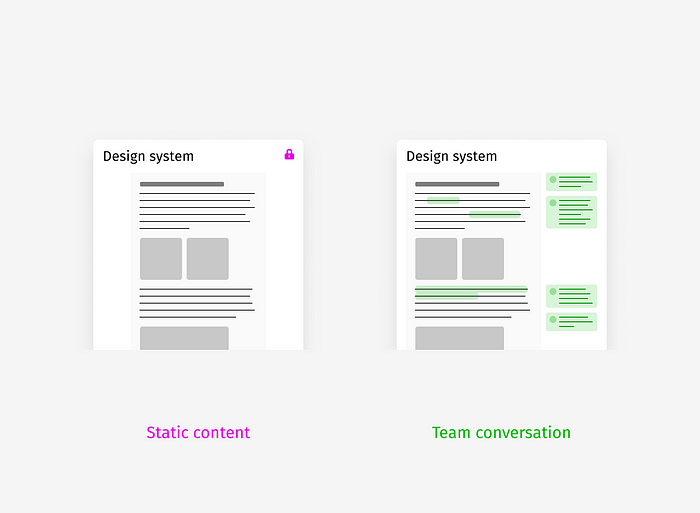
Pro tip: Team members rarely know how they are supposed to react, so you can help them by asking concrete questions.
Build bridges, not walls. The best knowledge bases, guidelines, and wikis are owned by a cross-functional team, not exclusively by representatives of one profession — designers, engineers, data analysts, product managers, etc. If you are building a common thing as a team, why not document stuff together in one place as well?

Example. You’ve described how your design team should conduct quality control of new features before their roll-out. Instead of keeping this isntruction as a separate page in the “Product Design” space, you add it to the general Product Wiki, where engneers, product managers, QAs store their information as well. Besides, instead of adding it separately, you inserted it into the already existing page “How we work on projects.”
Even if you follow all the advice, you may find out that documenting stuff is generally the wrong approach. If you are lucky enough to work in a passionate, close-knit team with high trust and common sense, you can just talk to each other. Remember: documentation is not a “natural” method of collaboration — it’s a business necessity when casual talking is ineffective, for example, when your team is too large and information gets lost. So, don’t forget to check if you can achieve the same effect in a simpler way without any write-up.

Example. Your design team often receives ad hoc requests from marketing, sales, and ops teams, which is quite chaotic and distracting. At first, you thought of an official process with Jira tickets, but it would be overkill. So instead, you created the “#design-request” Slack channel and a bot that assigned a designer on duty every week. This designer-on-duty picks those requests and spends a limited amount of weekly hours on them.
Choosing an optimal tool for storing and managing documentation often causes a lot of debate. But it’s easier than one may think if you focus on the main thing — the efficiency of team collaboration.
So, what tool to pick? Easy as pie:

You may hate Confluence, Google Drive, Dropbox Paper, Microsoft Office, or Notion, but documentation aims to boost team communication and common sense. That’s why it’s essential to reuse an already established info-sharing environment if it’s good enough.
Honestly, there are not many really important requirements to consider:
That’s it. It’s available in most modern tools. The rest of the features are nice to have, but they don’t matter if people won’t find the tool convenient enough and won’t visit it regularly.

Of course, it’s fantastic if your team is receptive to change. But in most teams that have been building something for a long time, there is already something in place, and changing the team’s habits may be perceived as an unnecessary effort.
Even if AI automates writing design documentation entirely or partially, our human perception will remain the same. So, here are the key thoughts on making documentation more effective and valuable:
Hope you find this advice helpful, and good luck with documenting! Feel free to share your tips and tricks in the comments.
Projector Creative & Tech Foundation has a noble goal — to provide modern IT education to 5000 Ukrainian women, including refugees who had to leave their homes or lost their loved ones because of the Russian invasion. Please support this project with your donation.
