
Wikipedia’s mission is to enable every single person on the planet free access to the sum of all human knowledge in the language of their choice.
But how does one go about finding what they are looking for on Wikipedia? Today most of our readers come across Wikipedia content through Google and other external search engines. But Wikipedia also has its own search that often goes unnoticed by readers. So what is the purpose of having search on Wikipedia when it is so easy to use external search engines to find content on Wikipedia? The Search Platform team has a summary of some reasons why search on Wikipedia is important. Privacy, safety, sharing and preserving knowledge, and caring about all language communities regardless of profitability, are some of the principles that govern search on Wikipedia.
It is not our goal to have Wikipedia replace popular search engines. However, it is important for search on-wiki to keep up with the key features that readers expect from search and serve those who are specifically looking for content on Wikipedia. After all, how difficult could it be to find things in the world’s largest encyclopedia? With the enormous amounts of great content added by our volunteers, not just on Wikipedia but all of its sister projects, improving the search and discovery of content is of vital importance.
One of the initiatives to improve finding and discovery of content is the Structured Data Across Wikimedia program, which aims to structure existing Wikipedia content so that it is machine-recognizable. Making our content machine recognizable or in other words adding metadata to organize unstructured data & media, makes searching easier and content more discoverable.
The Search Improvements project, with the help of structured content, aims to provide a more inviting and more efficient way to search and find content on the Wikipedias.
This post is a reflection on how we arrived at the improvements we made for search.
The design process began with research to better understand how people use search on Wikipedia. We reviewed the analytics, did UX analysis of current search, and ran qualitative interviews with readers. These research inquiries led us to general understanding on how readers are using our search and what might be blocking them from using its full potential.
We learnt that most of the research participants followed a general path to Wikipedia’s content.
However, not finding the desired content on Wikipedia is often a discovery problem rather than a content problem.
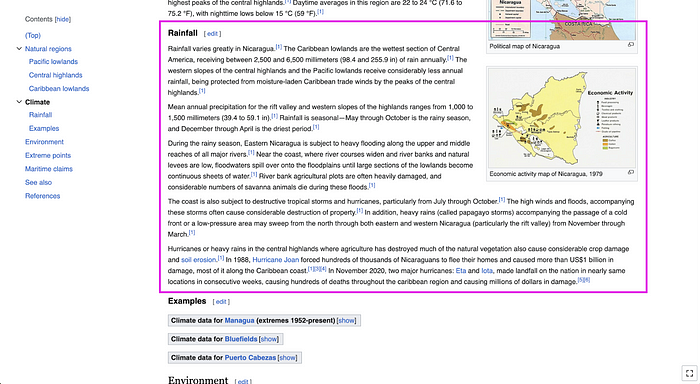
The current search box does an excellent job of finding article title matches. e.g. if one types “Nicaragua” the article name will be suggested in the dropdown.

But when one searches for “rainfall in Nicaragua”, because there is no article with that title, there are no suggested articles displayed.

This is because article suggestions in the search bar are not the result of a robust search over the entire text of Wikipedia articles, but are instead a result of a quicker process of matching the search query with only the title of an article.
However, as the typical reader doesn’t know this, their usual reaction is that the information they are looking for does not exist on Wikipedia. And this is when readers are likely to abandon searching on Wikipedia.
In such cases, even though an article matching the reader’s search term does not exist, it is likely that the information the reader seeks is hidden but available under sections or articles with different names or in sister projects like Wikimedia commons or Wikivoyage and other sources within our ecosystem. However, those places are not easily discoverable for readers.
If the readers were to click on the link in the search box that says “Search for pages containing rainfall in Nicaragua” it would take them to the Search page, which performs a more thorough search, resulting in other articles that may contain the desired information. The discovery of this page was missed consistently by the participants due to it being a bit hidden away in the UI. And the function of this page was not obvious for those who were shown the page.

Can the aforementioned more thorough search be made available in the search bar? Certainly. But only to some extent so that we don’t bloat the lightweight search bar with too much information. Including this level of broader search in the search bar would also require significant technological infrastructure improvements to maintain performance and latency. And while we could work on making the search bar more responsive to such queries, that would require a huge effort in both time and resources in building what already exists on the search page.
However, we found that the search page was difficult to use for readers based on our initial research. Improving this page would both encourage more usage and highlight the already existing functionality. Which is why for this project, we decided to focus on addressing the problems on the search page.
Due to the learnt behaviours on the Search bar, participants had a strong mental model that if the article is not suggested in the drop down it was a failed search — even if the Search page would show a wide variety of relevant results for the same search query. The current messaging that appears at the top of the results (a highly salient location) indicating “article not found”, reinforced this mental model.
We found out that a lot of these messages were customized by their respective communities with the intention of being one of the main ways in which users were taught to start their article creation process. Altering this message would cause more disruption in the short to medium term, so we concentrated on other immediate opportunities for improvement instead.

There were several visual design issues identified on the search page:
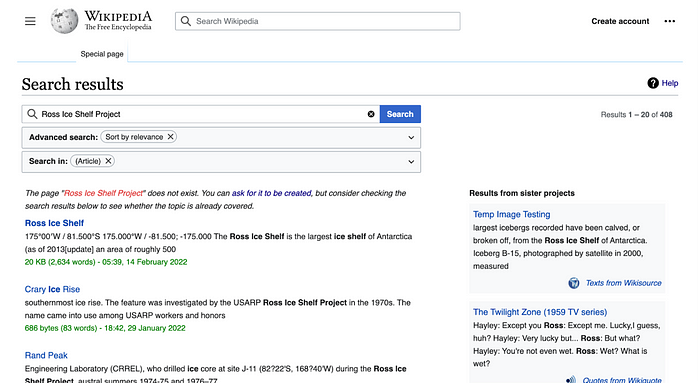
The snippets that appear on the search page help readers discover content within the article’s sections. However, most of the snippets are partial sentences that do not provide users with enough context of the article’s information. To read more of the snippet, the user would have to click through to the article and find that snippet on the page manually, increasing the amount of time it would take to find the information they are looking for, and leading them away from other potentially relevant results.

Most participants did not notice or pay attention to the second column of the search results which shows results from other projects that are part of the Wikimedia ecosystem. Participants assumed them to be ads due to the similar location of ads on other search engines. Ads are, in fact, against the principles that govern WMF products, but readers were not aware or conscious of this fact enough during their search to overcome their initial assumptions. We found that due to the general unawareness of these other WMF projects, the value of seeing search results from these projects was not made clear with our current page design.

Fixing some of the above problems and creating new opportunities for discovering content would pave the way for future search enhancements.
The Search page would especially be beneficial when an article title match is not found in the search bar. This may happen more often while searching for content in emerging language Wikipedias that often have fewer articles. Hence, we saw a great opportunity in improving this page for emerging language Wikipedias. A better broader search would allow searchers on smaller wikis to discover content within articles and in other Wikimedia projects, and not entirely rely on an article title match in the search bar.
By focusing on Portuguese, Russian and Indonesian Wikipedias, we could also build on the existing relationships between those communities and our team’s (Structured Data) community ambassadors in those wikis, allowing for better facilitations in receiving feedback from the community.
By this point we had a fairly good idea of what problem and opportunities we were going to go after. Which brings me to our next steps in the process: drafting user stories.
User stories help articulate the user needs and allows us to have a better understanding of why users want a certain functionality. It also ensures that the team remains on the same page when ideating on solutions. It serves as not only a tool for understanding user needs but also a tool for better collaboration.
The following user stories were written to provide focus areas for the search page improvements.
When I am looking at search results on the Special:Search page
I want to be able to easily scan the page,
so that I can quickly locate the information I am looking for.
When I am looking at the results on the Special:Search page
I want to be able to see key information,
so that I can evaluate the relevance of various search results and find the information I was seeking..
When going through search on special:search page
I want to be able to see links to relevant content like linked galleries, wikiquotes etc,
so that I can discover and explore other Wikimedia projects for relevant content.
After a series of team activities, design sessions, and feedback rounds we settled on the following improvements for the Search page.
To address the user needs presented in the user story #1, we introduced article thumbnail images in search results. They were added to serve as a visual navigational aid in an otherwise text heavy page. Thumbnails can also assist searchers in finding information quickly: e.g. if one only knew roughly how a yellow daisy looked, thumbnails can easily help that user locate the right name for the flower. Adding visuals proved to be useful to the research participants we showed these designs to.

We also used this opportunity to fix some of the other visual design problems mentioned earlier in the post. Since we felt that most readers would benefit from all these changes, we released this across all Wikipedias.
Search Preview was introduced to address the needs presented in user story #2 and #3. Its purpose was to surface key information pertaining to the result and provide necessary context, so that the user could evaluate the relevance of search results without leaving the results page. Previews also help the readers go directly to the section of an article that they are interested in, thereby reducing the amount of the time it would take the user to find information within articles. Search previews also serve as a space to surface relevant content from other Wikimedia projects for users to explore — such as related images from Wikimedia Commons. These designs were well received by readers in user tests and were reviewed with community members.

*Lead image of the article
*Expanded snippets
*Sections of the article
*Relevant images from Wikimedia Commons
*Links to other relevant pages in other Wikimedia projects
Due to the experimental nature of these solutions we decided to launch in Portuguese, Russian and Indonesian wikis after a few rounds of community consultation. We plan to learn from the usage of these features before launching it to other language wikis.
The process of defining what search preview on mobile would look like was more nuanced than just taking the desktop preview and designing it to fit the mobile screen.
If we were to take the desktop design as is and put it on mobile it would have resulted in a new page that the user would have to navigate to. This would defeat the purpose of having a quick glance at the contents of the article. If users have to go to a new page to see a preview they may as well go to the article itself.
We had to go back to the drawing board to see what would work for mobile. After several design explorations and feedback rounds, we settled on the following carousel design which when tested worked well with our users.
A few things we would like to do in the future to continue improving the search experience:
If you are part of one of the wikis where these features are released ( Portuguese, Russian and Indonesian) I hope you will try it out and provide feedback on the community page.
Thanks to Rita Ho & Matthew Williams for their design mentorship throughout the project; Michael Raish for helping with initial phases of design research; Rita Ho, Carolyn Li-Madeo, & Mike Pham for thoughtful edits and feedback on this post; and not to mention the Structured Data team for building these features & the Search platform team for providing technical support.
Originally published at https://design.wikimedia.org on March 17, 2023.
