
I’m sure you have already heard of ChatGPT with the recent hype and sky-rocketing social media interest. While it can be interesting to ask a chatbot random questions in natural human language, I’d like to explore how we might use ChatGPT for product management in apps.
In this article, I’ll share what ChatGPT can do, some prompting tips for better quality outcomes (prompt engineering), and the practical use cases with exact prompts that can be used for the product management and development of your apps.
For those who’re not yet familiar with ChatGPT, let me quickly introduce it to you. ChatGPT is a state-of-the-art (SOTA) large language model (LLM) developed by OpenAI. It’s a complex deep learning model with 175 billion parameters (think of it like neurons in our head) that is trained from massive amounts of language data like Wikipedia and other sources on the internet [1]. With this training, it can predict the probability of the next words in a sequence to form a response, given the context of your prompt and the previous texts it generated.

It gained its ability to chat with humans from many sample human conversations and from human feedback rating & ranking the text it generated (Reinforcement Learning from Human Feedback, RLHF) [2][3]. You can ask ChatGPT just like you’re talking to another person and it will answer you with the most probable answers. You can ask it to do a variety of tasks like summarization, writing articles, translation, text classification, explaining concepts, writing code, generating ideas, etc. But you should be careful that it may give you false information confidently because it’s not fact-checked (it’s essentially all probabilistic!).
Prompts are the questions or instructions that you give to ChatGPT. Good prompts produce good results. Writing better prompts has even become a skill called prompt engineering. Let me share with you some practical techniques for writing better prompts for LLM AIs.
Giving clear instructions. Instead of just asking a question, you can give instructions to the LLM on the steps to answer your question.
For the first prompt, the LLM will explain how linear regression models are trained on a high, conceptual level, but the second prompt will give you the exact functions to train a linear regression model step by step with explanations of the code.
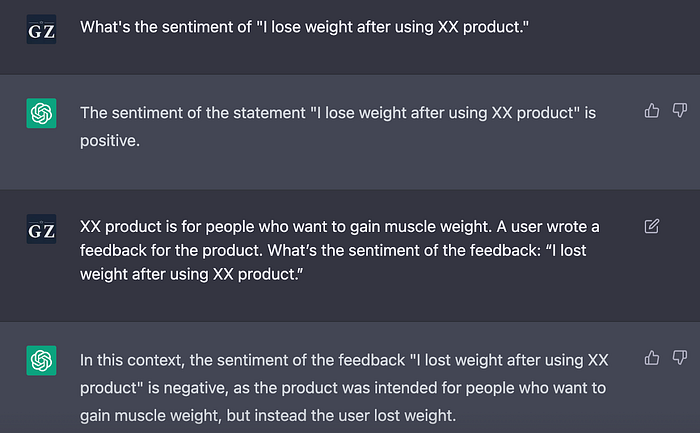
Provide it with context. Providing the context can help the LLM give more relevant responses. Here is an extreme example to illustrate this point:
This is an extreme case in which AI will categorize the first prompt as positive because it thinks losing weight is a positive outcome. But this is not the case for a muscle-gain product. When you provide the appropriate context, the LLM will give the correct sentiment analysis, which is negative.
Role prompting. Role prompting is similar to providing context, but you’re asking the LLM to pretend to be a specific role and give answers from that perspective.
One-shot, and few-shot prompts. For LLM, you can give a prompt directly (zero-shot prompting) [4]. But you can also provide an example (one-shot) or multiple examples (few-shot) before asking it to give you the answer [1]. This technique is found to elicit better responses from the LLM.
If you’re using the zero-shot question, it is likely that the AI will return answers like “nurse”, “secretary”, or “maid” because it’s trained on biased data. But if you provide a few examples, AI can overcome the bias and give gender-neutral results.
Chain-of-thought (CoT) prompting [5]. When you ask LLM more complex questions that require reasoning, it can give erroneous results. But if you ask it to explain its reasoning, it will produce better results by attempting to answer your question step by step. Research has shown that CoT prompting can improve the results of arithmetic, common sense, and symbolic reasoning tasks. A handy tip is to append the phrase “Let’s think step by step” at the end of your question [4].
The first prompt returns a result of sqrt(3), which is wrong. But when you add the phrase “Let’s think step by step” at the end, the LLM will give you a more elaborate answer by including the definition of the Pythagorean theorem and the calculation process. With these steps, it can give you the right answer 1.
You can incorporate ChatGPT in almost every step of your product workflow. Below are some ways that I’m using ChatGPT for my product workflow with the prompts I use. I hope they can spark some inspiration for you to optimize your product management process with the power of large language model AIs.
Generate app ideas & concepts. You can use ChatGPT as a brainstorming tool to generate ideas or design concepts. It can be a good starting point for ideation.
Conduct market research & competitor research. If you’re unfamiliar with a market and want to get a better idea of it, you can ask ChatGPT.
(Note: Because ChatGPT is trained on data before 2021, the answer may not be up-to-date. But it can give you a general idea of the market/important competitors.)

Generate user personas & profiles. You can use ChatGPT to create proto-personas or user profiles for your product. If you have insights from actual user research, you can provide them in your prompt for better results.
Write product requirement documents. You can ask ChatGPT to write a PRD from scratch as an inspiration or tell it to expand based on your main bullet points to save time on writing.
Incorporate chatbots into your product. With some fine-tuning or prompt engineering, you can incorporate chatbots into your product as a functionality. For this use case, you will need to work with your ML engineering or developers to see if it’s technically viable to use chatbots for your product’s specific use case. Here I’m giving a prompt engineering example of transforming ChatGPT into a sleep coach.
In this prompt, I used the role prompting technique that I introduced earlier in this article. I provided the context of the related information and specified that the chatbot should refuse to answer unrelated questions.
Improve user navigation experience. This is an experimental use case that I’m exploring in which the user can describe in natural sentences what they want to do and the chatbot will lead them to the related feature. I found that this is possible through few-shot prompt engineering or fine-tuning for classification. See the following image of the prompt and what it can do:

Write UX copy. You can ask ChatGPT to generate UX copies for buttons, error messages, etc. This is a very basic text generation task that ChatGPT can handle pretty well.
Ideate for page layouts or design concepts. If you’re coming up with ideas for a new page layout, you can ask ChatGPT for some potential ideas.
Translate UI copy. You can ask ChatGPT to translate your UI copy for localization with the following prompt.
Create content for consumption or SEO. Many apps have blogs for user acquisition, consumption, or boosting SEO. With ChatGPT, you can easily write blogs with just a few words.
Analyze user sentiment. Instead of training an ML model for analyzing user sentiment, you can use the following prompt to easily analyze user sentiment.
Summarize requested features & bugs. You can save time reading through a large amount of user feedback by asking ChatGPT to synthesize requested features & bugs from user feedback. Just provide the user feedback as context and ask it to summarize.
Analyze user interview scripts. You can give ChatGPT a transcript of your user interview and ask questions to analyze your user interview.
Create go-to-market plans. ChatGPT can help you draft go-to-market plans to launch your product.
Write press releases/social media posts. ChatGPT can easily create content for marketing. Just remember to provide it with the necessary context.

Respond to customer emails. When you’re unsure how to compose a difficult email, you can ask ChatGPT to write it for you.
The use cases and prompts above are just some examples of how you can use ChatGPT in your product management/development work. Although ChatGPT might look scarily potent, I believe that it will not replace our human intelligence and creativity. Just learn how to master it and we can harness its powers for boosting our creativity and productivity.
(If you’re interested in how I built a tool to help me improve product documents with GPT, you can read this article; if you want to know the solutions to the common problems while implementing GPT/LLM-backed apps, you can read Cookbook for solving common problems in building GPT/LLM apps for a detailed and comprehensive guide.)
References:
[1] Brown, Tom B., et al. Language Models Are Few-Shot Learners. arXiv, 22 July 2020. arXiv.org, https://doi.org/10.48550/arXiv.2005.14165.
[2] “ChatGPT: Optimizing Language Models for Dialogue.” OpenAI, 30 Nov. 2022, https://openai.com/blog/chatgpt/.
[3] Ouyang, Long, et al. Training Language Models to Follow Instructions with Human Feedback. arXiv, 4 Mar. 2022. arXiv.org, https://doi.org/10.48550/arXiv.2203.02155.
[4] Kojima, Takeshi, et al. Large Language Models Are Zero-Shot Reasoners. arXiv, 29 Jan. 2023. arXiv.org, https://doi.org/10.48550/arXiv.2205.11916.
[5] Wei, Jason, et al. Chain-of-Thought Prompting Elicits Reasoning in Large Language Models. arXiv, 10 Jan. 2023. arXiv.org, https://doi.org/10.48550/arXiv.2201.11903.
